
Whether you’re a CTO, an engineer, or anything in-between, AI — and the productivity gains in promises — is likely top-of-mind in your professional circles. AI mastery is now a must-have for engineers, as companies claim to generate at least 30% of their code and plan to increase that to 95% within five years.
So, how much more productive have we all become, really?
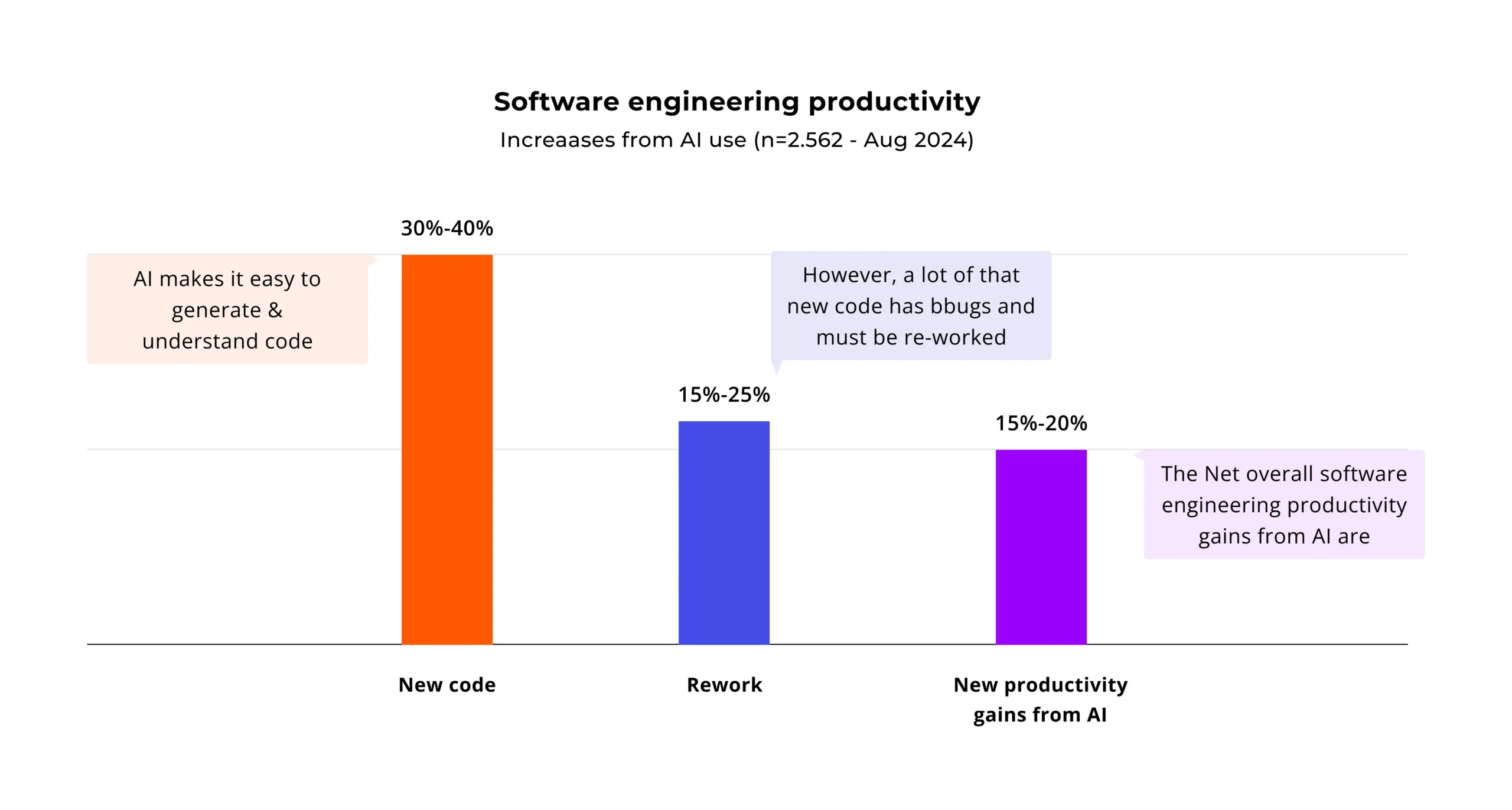
A recent study by Stanford University found that, specifically in enterprise code production, there’s a 30–40% productivity increase driven by AI. The catch, however, is that roughly half of this is buggy, unmaintainable, or otherwise problematic code that needs rework. As a result, the net increase in productivity drops to around 15–20%.
A big part of the rework problem is that AI-generated code tends to compound technical debt. Overreliance on AI for code generation introduces significant risks to maintainability and team velocity. It creates systems that are exponentially more costly to maintain due to hidden entanglement between components, obscure glue code, and unmanageable configuration sprawl.
As most technical experts know (and some non-technical people need to be reminded about), technical debt isn’t purely an engineering problem. Maintaining codebases can cost 3 times as much as initial development, and technical debt directly impacts maintenance. As a result, by keeping their reliance on AI in check, dev teams can narrow the productivity gap associated with hard-to-maintain generated code.
Identifying the problem: the four pitfalls of vibe coding
While vibe coding can be valuable for prototyping and citizen development, it often becomes an anti-pattern in professional software engineering. Engineers who rely on prompting and stitching code snippets together based on a “vibe” or intuition often face four pitfalls:
- The black box problem: Accepting AI-generated code without fundamentally understanding how or why it works creates an unmaintainable system. If you can’t debug, optimize, or extend the code, the resulting solution becomes brittle and unstable.
- Architectural drift: Building features in a prompt-by-prompt fashion, without an overarching architectural plan, typically results in a Frankenstein-style codebase where components are haphazardly stitched together.
- Forgetting the fundamentals: According to MIT, relying too heavily on AI can erode the critical thinking and problem-solving skills central to software engineering. As a result, debugging devolves into “prompt-and-pray,” and developers slowly lose the ability to design solutions or optimize performance.
- Blind spots: Trained on public code, AI models can inadvertently introduce known security vulnerabilities, outdated dependencies, or code with restrictive or incompatible licenses.
The key takeaway here is that AI is an invaluable co-pilot. Still, the developer must remain the pilot — owning the navigation, the controls, and the final destination. In my experience, there are three principles for developers to follow (and for companies to encourage) that can help maintain this balance.
Principle 1: Plan first, prompt later
While vibe-coders treat AI as the all-knowing code oracle, for professional engineers, it’s more like a junior developer who knows nothing about your business, product, or architecture. So it’s the engineers’ job to provide this context to the AI.
With this in mind, there are a few things that developers need to be mindful of before they start prompting:
- What are the requirements, and are they clear?
- Are there already accepted architecture and coding standards for this project?
- What is the “contract” or interface for the new piece of code?
As AI increasingly takes on code generation, the value delivered by human engineers shifts toward understanding the big picture — and interpreting it for coding assistants. This shift in priorities doesn’t always happen organically within teams: tech leaders need to communicate it to engineers to encourage greater awareness of and ownership over projects.
Principle 2: Give AI a rulebook
If AI is your junior dev, you wouldn’t trust it to start coding away without detailed, actionable guidance. In most teams, this guidance takes the shape of an AGENTS.md file.
If this is the first time you’ve encountered AGENTS.md, consider it a README.md for AI agents. This open format provides a single source of truth for context and instructions that all AI agents must follow. It keeps your human-facing README.md clean and focused, moves context out of your brain and into your repo, and gives the same instructions to all AI tools.
A typical AGENTS.md file covers the following project aspects:
- Architectural principles:
- What: “This is a 3-tier architecture. NEVER put database logic in a UI component. All business logic belongs in the ‘services/’ directory.”
- Why: This directly prevents architectural drift and stops the AI from taking shortcuts that create massive tech debt.
- Tech stack and key libraries:
- What: “We use React 18, TypeScript, Tailwind CSS, and Zustand for state management.”
- Why: Prevents the AI from suggesting jQuery, Redux, or outdated patterns you don’t use.
- Set-up and test commands:
- What: “npm install, npm run test, npm run lint.”
- Why: AIs can (and should) be prompted to validate their own code against your project’s standards.
- Code style and naming conventions:
- What: “All components are PascalCase. All hooks must start with ‘use.’ All API calls are in files ending in .service.ts.”
- Why: Enforces consistency and stops the AI from inventing its own (often messy) patterns.
- Security and project “gotchas”:
- What: “NEVER log raw user PII. All API keys must be loaded from the environment vault, not hard-coded.”
- Why: Hard-codes critical, non-negotiable rules for the AI to follow.
Essentially, the AGENTS.md file is your AI’s “new employee onboarding” handbook. When creating this document, your goal is to answer every question a new “developer” would ask — before they ask it. Doing so reduces the risk of architecture drift and limits AI’s ability to introduce vulnerabilities or other issues into the codebase.
Principle 3: Ask the AI to explain, not just code
This principle is where we stop comparing the AI to a junior dev and start treating it more like a teacher. Instead of only asking the AI to write code, developers can phrase prompts around problem-solving approaches, logic, and the specific steps taken. Think of this as reverse rubberducking: an inanimate object explains stuff to living beings.
Let’s examine three examples of prompts that most developers need to add to their AI coding arsenal:
- Exploring new solutions: “Name three different design patterns I could use to solve this data-caching problem. List the pros and cons of each in the context of my project.”
- Understanding legacy or complex code: “This function is complex and has no comments. Can you explain what it does step-by-step, identify potential edge cases, and refactor it to be more readable?”
- Learning new algorithms and concepts: “Explain the ‘Strategy’ pattern in the context of a shipping calculator. Now, show me how to apply it to the OrderProcessor class from my AGENTS.md file.”
By working in this manner, developers can prevent black-box outputs, guiding AI towards more explainable, maintainable code. This approach also enables a more proactive, engaged collaboration between the developer and the AI, helping keep the human experts’ skills sharp.
Key takeaways
AI is the most powerful tool we’ve ever had for building tech debt or building quality. The craftsmanship of your developers determines that choice.
- AI won’t replace developers, but… developers who use AI strategically will replace those who don’t. Tech leaders need to clearly communicate to developers that their value is shifting from writing code to designing, guiding, and validating solutions.
- Stop vibe-coding and start context engineering. The quality of the AI output is a direct reflection of the quality of the developers’ input. By adopting and treating AGENTS.md as a critical part of the codebase, teams can improve the quality of generated code — and decrease the amount of tech debt produced by AI.
- Ask AI to explain its actions. Don’t just delegate — interrogate. Use AI to explore options, learn new patterns, and refactor complex code.
Following these principles has consistently enabled us to boost productivity by 30% and more on client projects, creating maintainable, high-quality code. Coupled with AI for unit testing, documentation, and more, this yields even more significant speed and productivity improvements. If you want to learn more about our approach to AI augmentation — and how this approach can benefit your digital initiatives — book a call with our experts.