Thanks to artificial intelligence (AI), your engineers can now rapidly prototype a vendor’s core features with a coding agent, and the demo looks convincing. The custom software vs off-the-shelf decision looks different now: every software renewal seems negotiable, while every custom build appears cheap.
One problem remains, though. Teams that decide based on the prototype alone discover the real costs later, when the software needs patches, documentation, and someone accountable for its maintenance.
TL;DR
The build vs. buy software decision comes down to three rules:
- Buy solved problems. Commercial software works well for standardized business functions such as payroll, accounting, invoicing, and basic customer relationship management (CRM).
- Build what differentiates you. Custom software makes sense for workflows, integrations, or product capabilities that determine your competitive advantage.
- Budget for ownership, not just development. AI can reduce implementation costs, but maintenance, security, infrastructure, and ongoing improvements remain your responsibility.
The five-question framework below helps you evaluate your requirements, budget, and engineering capacity.
How AI changes the build vs buy equation
AI coding agents are making in-house builds an increasingly viable alternative to commercial products. McKinsey’s 2026 State of AI survey found that 32% of organizations had decided against buying at least one software product or feature because coding agents could build it internally. The shift is particularly relevant to technology and healthcare companies, where respondents reported the highest rates of software substitution.
AI is also moving beyond experimentation. G2’s 2026 AI Agents Report found that 66% of agent buyers run AI agents in limited or scaled production.
For engineering leaders, the conversation is changing in two ways. Coding assistants and agents reduce the time and cost of prototyping software, validating requirements, and implementing features. Yet building software is only part of the investment. Production systems still need security controls, documentation, quality assurance and testing, infrastructure, maintenance, and accountable owners. The initial development advantage can disappear if teams underestimate these responsibilities.
What is the difference between custom software and off-the-shelf software?
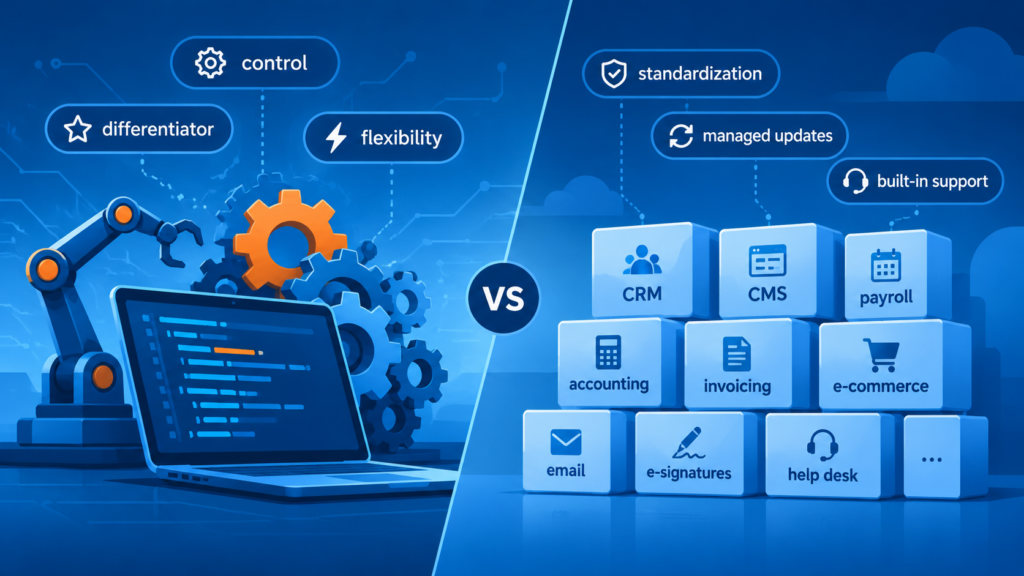
Custom software is built around one organization’s specific requirements, while off-the-shelf software offers ready-made functionality designed for a broader market. Understanding this distinction helps determine which approach fits your workflows, budget, and growth plans.
What is custom software and how does it work?
Custom software is an application or system developed to meet the specific requirements of an organization, product, or user group. A business can commission a development team to build it from scratch or extend an existing codebase to introduce new functionality.
The development process typically starts with requirements discovery and solution design. Engineers then build, test, and deploy the software, with further development and maintenance continuing throughout its lifecycle.
Custom solutions can serve internal business operations, customer-facing products, or both. Examples include proprietary CRM platforms, industry-specific management systems, custom analytics dashboards, and applications that connect otherwise incompatible enterprise systems.
What is off-the-shelf software and how does it work?
Off-the-shelf software is a ready-made product developed for a broad audience with common requirements. Businesses can purchase a license or subscription, configure available features, and integrate the product into their existing workflows.
Examples include Salesforce for CRM, QuickBooks for accounting, Jira for project management, and Shopify for e-commerce. These products provide established functionality without requiring organizations to build and maintain an entire application themselves.
Most commercial products offer some customization through settings, extensions, plugins, application programming interfaces (APIs), or low-code tools. However, the available options depend on the vendor’s architecture and product roadmap. Organizations must work within those boundaries unless they can develop additional functionality around the product.
How off-the-shelf software implementation works
Implementing off-the-shelf software usually takes significantly less time than developing a custom application. Instead of building core functionality, the team selects a product, configures it, connects it to existing systems, and prepares users to work with it.
The implementation process typically includes:
- Product selection: Evaluating vendors against business requirements, technical compatibility, security, and pricing.
- Configuration: Setting up user roles, workflows, permissions, and available features.
- Data preparation and migration: Cleaning, validating, deduplicating, and restructuring existing data before transferring it into the new system.
- Integration: Connecting the product to existing applications and ensuring that data flows correctly between them.
- Extension (optional): Building plugins, add-ons, or custom components where the product’s built-in options fall short.
- Testing and rollout: Validating configurations and integrations before making the product available to users.
- Ongoing administration: Managing subscriptions, permissions, vendor updates, integrations, and user support.
Low-code and no-code platforms can further reduce implementation effort by allowing teams to configure workflows and build simple applications with limited programming. AI features can also help users create automations, generate formulas, and configure integrations through natural-language instructions.
However, businesses remain dependent on the vendor’s product capabilities, release schedule, and support policies. Extensive customization can also introduce development and maintenance work, narrowing the initial cost and speed advantage.
Key takeaway: Both options carry ownership work. With custom software, your engineers carry all of it. With off-the-shelf software, the vendor maintains the core product, and your team handles configuration, integrations, and administration.
What is the custom software development process?
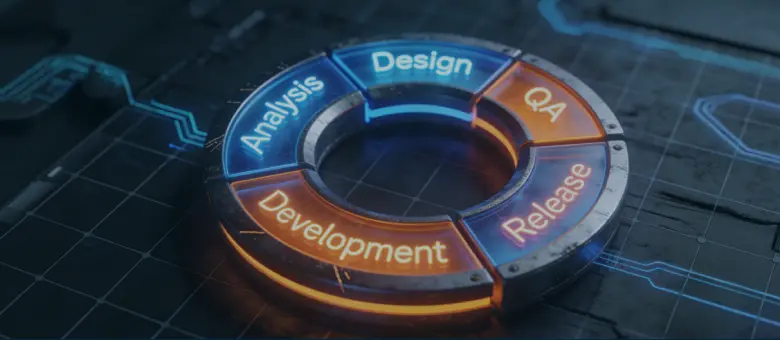
The custom software development process takes a business need from initial discovery to a production-ready solution. It typically includes six stages: discovery, design, development, quality assurance, deployment, and maintenance. AI can accelerate work across these stages, but human oversight remains essential for architectural decisions, quality control, and security.
1. Discovery and requirements gathering
The discovery stage establishes what the software needs to do, who will use it, and which business outcomes it should support. AI tools can help analyze existing documentation, summarize stakeholder interviews, identify gaps in requirements, and turn business needs into initial user stories. Teams still need to validate assumptions with stakeholders and resolve conflicting requirements.
2. Solution design and architecture
During this stage, the team defines the software’s architecture, data models, integrations, user experience, and technical requirements. Engineers and architects stay responsible for evaluating trade-offs, addressing security requirements, and ensuring the solution fits the production environment. AI helps at the edges, with architectural research, interface prototyping, and initial design specifications.
3. Development and implementation
Engineers turn the approved design into working software by implementing core functionality, building interfaces, and connecting external services. This is where AI delivers the most visible gains. Coding assistants and agents generate boilerplate code, implement routine features, suggest fixes, and help engineers navigate unfamiliar codebases. Generated code still requires review, testing, and integration into the wider system.
For instance, on The Banner project described below, the AgileEngine team’s workflow included Copilot, Cursor, and ChatGPT, and an AI-driven content classification system went from project start to release in three weeks.
4. Quality assurance and testing
Quality assurance (QA) verifies that the software meets functional requirements and performs reliably under expected conditions. AI tools generate test cases, expand automated test coverage, analyze failures, and flag potential defects. Human QA engineers still validate test relevance, investigate edge cases, and assess the application’s behavior.
5. Deployment and release
Deployment moves the tested application into production. The process involves configuring infrastructure, setting up continuous integration and continuous delivery (CI/CD) pipelines, migrating data where necessary, and establishing monitoring and rollback procedures. AI can help generate deployment scripts and review configurations, but production releases still require controlled access and environment validation.
6. Maintenance and continuous improvement
After launch, the team monitors the application, fixes defects, applies security updates, and adapts the software to changing business requirements. AI agents can help analyze logs, identify anomalies, suggest fixes, and automate routine maintenance tasks. Teams still need accountable owners to review changes, manage dependencies, and prevent regressions.
Key takeaway: AI speeds up development and testing more than discovery or maintenance. Use the time you save on those two stages instead of cutting them.
Custom software vs off-the-shelf: how do they compare?
Custom software offers greater control over functionality, architecture, and long-term development. Off-the-shelf products provide ready-made capabilities with lower initial investment and faster implementation. The right choice depends on how closely each option fits your requirements and how much ownership your team can take on.
| Dimension | Custom software | Off-the-shelf software |
| Development and implementation | Discovery, design, build, test, and deploy. Longer to launch, though AI speeds up parts. | Product selection, setup, data migration, integration, and rollout. Usually faster. |
| Customization | Tailored to your requirements, user experience, and architecture. | Limited to vendor settings, APIs, plugins, and extensions. |
| Cost dynamics | Higher upfront cost. Later costs: maintenance, infrastructure, staffing, and new features. | Lower initial cost. Fees can grow with users, tiers, add-ons, and usage. |
| Scalability | Designed around expected growth; needs architectural planning and engineering investment. | Depends on vendor infrastructure, pricing tiers, and usage limits. |
| Integration | Connects to existing systems through custom APIs and data pipelines. | Standard integrations and APIs; legacy or niche systems may need extra development. |
| Control and ownership | You control the roadmap, technology stack, data architecture, and release schedule. | The vendor controls the roadmap, updates, infrastructure, and availability. |
| Security | You secure the application, infrastructure, dependencies, and data. More control means more responsibility. | The vendor secures the core product. You manage access, configuration, and data governance. |
| Maintenance and support | Needs ongoing engineering capacity for fixes, updates, and monitoring. | The vendor maintains the core product. You manage configuration, integrations, and user support. |
Security responsibility doesn’t disappear with either option. Custom development gives organizations more control over security architecture and update schedules, while commercial products shift some responsibilities to the vendor. Under the shared responsibility model, though, customers still own access controls, configuration, and data governance. AI coding tools can accelerate implementation, but they don’t remove the need for secure design, code review, and ongoing maintenance.
Scalability also depends on more than infrastructure. A product may support a growing number of users while becoming too restrictive for the organization’s workflows, integrations, or pricing needs. Evaluate both technical capacity and the cost of scaling.
Build vs buy software: five questions to decide
A software decision goes wrong in one of two ways. Either the product belongs to the wrong category, such as a CRM stretched to run project delivery, or it belongs to the right category but runs on default settings that never matched your process. Only the first problem justifies a new tool; the second calls for better configuration. A structured build-or-buy assessment helps you tell the two apart. Use these five questions to evaluate whether custom development or an off-the-shelf product is the better fit.
1. Does the software solve a common problem or a unique one?
Common problems usually call for buying, and unique ones for building. Many business functions are well understood and already supported by mature commercial products, such as payment processing, payroll, accounting, email, e-signatures, and help desk ticketing.
Building these capabilities from scratch rarely creates a competitive advantage. A ready-made product can cover the requirements with less development effort and a shorter implementation timeline.
The situation changes when the software must support workflows or business rules that standard products cannot accommodate. If the required functionality is specific to your operations or product, custom development may be the more practical option.
2. Is the software critical to your competitive advantage?
If the software shapes how your company competes, lean toward building it. When it supports a distinctive customer experience, proprietary process, or core product capability, relying on a vendor’s roadmap can limit your options.
Custom software gives you control over the features and release priorities that matter to your business. You can adapt the solution as your strategy evolves and build functionality to meet your own requirements.
For supporting functions, that level of control may not justify the investment. A commercial product can handle routine operations while your engineering team focuses on capabilities that differentiate the business.
3. What will the software cost over three years?
Compare the total cost of ownership (TCO), not just the initial development quote or subscription price. A three-year estimate provides a useful planning horizon for evaluating implementation costs and recurring expenses.
For custom software, account for discovery, design, development, testing, infrastructure, security, maintenance, and future improvements. Include the cost of hiring or retaining the people responsible for the application.
For off-the-shelf products, consider licenses, implementation, data migration, integrations, training, support tiers, and usage-based charges. Check how pricing changes as you add users, increase usage, or require more advanced features.
Your estimate will only be as reliable as your requirements. Validate the scope, integrations, and expected workloads before comparing options. A discovery phase can help identify hidden complexity and reduce the risk of underestimating either approach.
4. Do you have the talent and capacity to maintain a custom solution?
Custom software requires people who can build, test, operate, and improve it. Assess your access to software engineers, solution architects, designers, QA specialists, and security expertise. Consider both the initial development effort and the capacity needed after launch.
If your current team lacks the required skills, you may need to hire or work with a dedicated development team. A remote development team can help fill specific skill gaps and accelerate delivery without requiring a permanent expansion of your in-house team.
Off-the-shelf software generally requires less engineering capacity, although low-code platforms and large, setup-heavy tools often depend on specialists who know that specific product. Someone still needs to manage configuration, integrations, permissions, vendor updates, and user support. Make sure the operational workload fits your team’s capacity.
5. Will the solution support your growth?
Choose the option that still fits when your business is larger. Consider a scenario in which user numbers increase fivefold, new departments adopt the system, or the product needs to support additional markets and workflows.
With custom software, you can plan the architecture around expected growth and extend functionality as requirements evolve. This flexibility comes with engineering costs, and the original design must account for likely changes.
Commercial products may scale easily in terms of users and infrastructure. The constraints often emerge elsewhere: pricing tiers, usage limits, integration options, or features that cannot accommodate more complex workflows. Review the vendor’s product roadmap and upgrade costs before committing. List your must-have features and integrations first, so every option is measured against the same requirements.
Cut software engineering and design costs by over 50% by engaging thoroughly vetted experts across 15+ global hubs.
Talk to our expertsWhen should you build custom software or buy an existing product?
Use custom development when the software supports unique requirements, competitive advantage, or workflows that commercial products cannot accommodate. Choose off-the-shelf software when the problem is standardized and a mature product meets your needs.
| Custom software is a better fit when… | Off-the-shelf software is a better fit when… |
| The software supports a distinctive product or business process. | The software handles a common business function. |
| Standard products cannot meet essential requirements. | A commercial product covers most requirements with limited configuration. |
| You need control over the roadmap, architecture, and integrations. | Vendor-managed updates and support are sufficient. |
| You have access to the expertise needed to build and maintain it. | Your team has limited engineering capacity for ongoing ownership. |
| Long-term flexibility justifies the initial investment. | Faster implementation and predictable subscription costs are priorities. |
Key takeaway: Questions 1 and 2 settle most cases. Questions 3 to 5 test whether you can afford and sustain the choice.
The hybrid approach: combine custom and off-the-shelf software
Custom development and off-the-shelf products don’t have to be mutually exclusive. Many organizations use commercial software for standard business functions and build custom components around it. This approach can reduce initial development effort while preserving flexibility where it matters.
Start with a ready-made product and replace it as you grow
An off-the-shelf product can be a sensible starting point when your requirements are still evolving. It lets you launch faster and validate workflows without upfront investment in a custom application.
Over time, however, the product may become a constraint. Its pricing model may no longer make sense at your scale, its integrations may limit automation, or its functionality may not support increasingly specialized workflows. When these limitations begin to affect business performance, replacing the product with a custom solution may become more cost-effective.
The transition doesn’t have to happen all at once. You can develop the replacement in stages, migrate data and workflows incrementally, and retire the commercial product once the custom solution is ready. This approach lets you defer the larger investment until your requirements justify it.
Use a buy-and-extend model
A buy-and-extend strategy combines a proven commercial product with a focused custom layer. The commercial product handles core functionality, while custom software addresses requirements that are specific to your business.
APIs connect the two layers and allow them to exchange data. For example, a company might use an off-the-shelf CRM for contact management and sales records while building a custom application for specialized quoting, pricing, or approval workflows.
The key is to keep the custom layer focused. Extending a commercial product should address clear gaps in functionality, not recreate features the vendor already provides.
Key takeaway: Decide per capability, not per company. One product can combine bought and built components.
Hybrid approach in practice: two AgileEngine case studies
The build-versus-buy decision often evolves as a business grows. These two projects show the hybrid models in practice: replacing a commercial product when its limitations become a constraint, and extending one with custom engineering.
Replacing a white-label app with a custom mobile product
The Baltimore Banner, a Pulitzer Prize-winning news platform with more than 80,000 paying subscribers, needed greater control over its mobile product. Its white-label application imposed user experience constraints and limited the company’s product roadmap.
AgileEngine’s seven-person team built a custom iOS and Android application from scratch in six months. The new product introduced personalized content, dedicated audio and video experiences, offline access, and integrations across subscription management, analytics, and advertising. A shadow migration transferred active sessions and user preferences without disrupting subscribers. The case study projects 43% lower subscriber churn thanks to personalization.
Modernizing Shopify for an e-commerce retailer with 300+ brands
AgileEngine’s engagement with 2Modern, an e-commerce retailer carrying 300+ premium brands, illustrates how custom development can extend an off-the-shelf platform while preserving its core capabilities.
2Modern partnered with AgileEngine to modernize its Shopify storefront. The retailer needed additional engineering capacity to improve performance, reduce technical debt, and maintain its frontend.
AgileEngine’s engineers developed new Shopify Theme 2.0 sections, refactored duplicated logic into reusable components, and optimized CSS and asset loading. The team also maintained integrations with SearchSpring and third-party applications, improving the storefront without introducing unnecessary complexity.
Key takeaway: Extending a commercial product or replacing it both take specialized engineering skills. A remote dedicated team can supply that expertise at a lower cost than in-house hiring, while keeping the engineering bar high.
Increase the ROI of software projects by over 3x with AI-augmented remote development and design solutions tailored to your business goals.
Book a consultationWhat are the advantages and disadvantages of custom software?
Custom software provides a closer fit between an organization’s technology and business, but it also creates a long-term engineering commitment. Before investing in a custom solution, consider the benefits it can deliver and the resources required to sustain it. The comparison table above shows the differences side by side. The lists below cover what they mean in practice.
Advantages of custom software
- A closer fit for business requirements. You can shape functionality around specific processes, user needs, and product goals. This helps avoid workarounds and compromises imposed by generic software.
- Freedom to choose your technology stack. You can select frameworks, platforms, and infrastructure that align with your existing systems and your engineering team’s expertise and the talent pool you can hire from. This also reduces dependence on technologies chosen by an external vendor.
- More efficient workflows and spending. A solution designed around your operations can eliminate redundant steps, automate manual tasks, and reduce reliance on disconnected tools. You also pay only for features you need, and no vendor controls your subscription pricing.
- Room to evolve without vendor-imposed limits. You can introduce new functionality, adjust capacity, and change the architecture as your requirements develop, without per-user fees or vendor-set caps.
- Proprietary capabilities. Custom software can support business processes and product features that competitors cannot easily replicate through standard commercial tools. This can make the software itself a source of competitive differentiation.
- Integration flexibility. You can design data flows and interfaces around your existing systems, including legacy platforms and specialized services that standard connectors don’t cover.
- Greater control over security and data. You can define how the application handles sensitive information, manages access, and applies security updates. You also have more influence over where data resides and how the system is operated. Good vendors secure their products well, but each additional vendor widens your attack perimeter.
Disadvantages of custom software
- Significant upfront investment. The project requires funding for discovery, design, engineering, testing, and deployment. Complex workflows, third-party integrations, and regulatory requirements can increase the budget.
- A longer path to launch. Custom functionality takes time to specify, implement, and validate. AI coding tools can shorten parts of the development cycle, but teams still need to make architectural decisions and verify the resulting software.
- Dependence on specialized talent. You need people who understand the application and can develop, test, and operate it. If those skills aren’t available internally, hiring or external development support adds to the investment.
- Ongoing ownership costs. The initial release is only the beginning. Your organization must fund infrastructure, monitoring, bug fixes, dependency updates, security work, and further development throughout the software’s lifecycle.
- Responsibility for delivery and maintenance risks. Poorly defined requirements, underestimated complexity, and weak technical decisions can lead to delays or expensive rework. Staff turnover can create additional risks if the team doesn’t maintain adequate documentation and knowledge transfer.
Key takeaway: Weigh the disadvantages first. Fit and control only pay off if you can fund and staff the ownership duties that follow.
What are the advantages and disadvantages of off-the-shelf software?
Off-the-shelf software gives businesses access to established functionality without funding a custom development project. Vendors also take responsibility for much of the product’s maintenance and support. These benefits come with constraints around customization, pricing, and control over the product’s future.
Advantages of off-the-shelf software
- Lower initial investment. Businesses can access ready-made functionality through a license or subscription. They avoid the upfront cost of designing, developing, and testing an application from scratch.
- Faster implementation. Teams can configure an existing product, migrate their data, and integrate it with current systems. This usually takes less time than developing an equivalent solution.
- Vendor-managed updates. Vendors maintain the core product, release new features, and provide security patches. This reduces the amount of engineering work required from the customer, although teams still need to review updates and manage their own configurations.
- Familiar interfaces and established workflows. Popular products often follow conventions that users already understand. This can reduce training requirements and make adoption easier, especially when employees have used similar tools before.
- Built-in support and documentation. Commercial vendors typically provide product documentation, troubleshooting resources, and customer support. Vendors often compete on support, but quality varies by vendor and subscription tier, so check what the contract actually includes.
- Market-tested functionality. Established products have been used by multiple organizations and refined through customer feedback. Reviews on platforms such as G2 and analyst assessments can help evaluate usability, reliability, and vendor reputation.
Disadvantages of off-the-shelf software
- Your processes bend around the product. Customization and configuration options, plugins, and APIs may not cover every business requirement. Teams then adapt their workflows to the product’s features and constraints, retrain staff, and build workarounds around the gaps. Over time, switching gets harder, because processes, integrations, and habits all depend on one product.
- Setup and upkeep still take specialized expertise. Ready-made doesn’t mean set and forget. Complex platforms need configuration, data migration, permissions design, and continuous tuning. Low-code platforms and large, setup-heavy tools often depend on specialists who know that specific product, or on an implementation partner. Hiring or retaining them can offset part of the cost advantage.
- The vendor controls the roadmap and upgrade timing. The vendor decides which features to develop, change, or discontinue, and when upgrades happen. A product update can alter an established workflow, while removing a niche feature may leave customers searching for alternatives. Customers also depend on the vendor to maintain the underlying platform and release fixes, with limited influence over how long older versions remain supported. Even white-label products leave the vendor in charge of the core platform.
- Vendor updates can break your integrations. The vendor sets the release schedule, and changes to APIs, data fields, or authentication can break connectors your team built. Your engineers then have to test and fix them on the vendor’s timeline, which is hard to plan around. Major commercial products often provide standard integrations, but connecting niche applications, legacy systems, or specialized data sources can still require custom development and ongoing maintenance.
- Costs and limits that grow with usage. Subscription fees can increase as the organization adds users, storage, integrations, or advanced features. Some products also charge based on transactions or consumption, making long-term costs harder to predict. A product may also keep up with more users and higher workloads while becoming less suitable for complex operations. Pricing tiers, usage limits, permission models, or workflow restrictions can create a growth tax as requirements expand.
- Feature bloat. Commercial products often serve a broad customer base, so they may include functionality your organization never uses. This can make interfaces more complex and lead businesses to pay for features that add little value.
Vendor control over upgrade timing also has security implications when vendors still rely on older languages and frameworks because migrating is too disruptive. As AI-assisted vulnerability research improves, legacy technology may come under increasing scrutiny from both defenders and attackers.
This risk isn’t unique to off-the-shelf software, since custom applications built on outdated dependencies face the same exposure. The main question is who monitors the technology stack, applies patches, and plans upgrades. With off-the-shelf products, much of that responsibility sits with the vendor, but customers still need to assess the vendor’s security practices and understand their own responsibilities.
Key takeaway: Before you sign, ask who patches the platform, what happens if the vendor drops a feature you rely on, and how pricing changes at your year-three usage.
How does AI change the cost of custom software?
AI can reduce the upfront cost of custom development, but the savings depend heavily on a team’s ability to use these tools effectively. With appropriate guardrails, clear project context for the agents (such as architecture notes, coding standards, and acceptance criteria), and systematic verification, AI can accelerate development and speed up critical workflows such as prototyping, shortening feedback cycles from weeks to 1–2 days. Without these practices, AI-generated code can shift bottlenecks downstream, creating more work during code review, testing, debugging, and maintenance.
The data shows that shift. In Atlassian’s 2026 State of Developer Experience report, the share of developers saving at least 10 hours a week with AI fell from 68% to 25% in a year. According to LeadDev’s coverage of the survey, 65% of developers now regularly spend time reviewing, debugging, and correcting AI-generated code. The survey covered 1,155 developers and 405 engineering leaders.
Faster implementation doesn’t automatically mean lower three-year TCO either. The initial savings still need to be weighed against the ongoing costs of infrastructure, security, maintenance, and further development. Running AI also has a price: about one in five respondents in McKinsey’s survey said operating costs, including token costs, limited their AI use.
Key takeaway: AI can reduce implementation costs, but ownership costs still depend on architecture, operational requirements, and how the software evolves.
How to keep AI-built custom software maintainable and secure
AI-assisted development can introduce complexity faster than teams can manage it. Maintainability and security depend on engineering discipline, clear ownership, and guardrails that constrain what AI agents can change.
Prevent maintenance debt through replaceable components
AI-generated code can introduce unnecessary abstractions, duplicated logic, and tightly coupled components. Teams should favor small, replaceable services with strict interface schemas. Three practices help contain complexity:
- Design for deletion. Keep components modular enough to replace or remove without rewriting unrelated functionality.
- Enforce complexity limits. Use automated checks for oversized modules, excessive dependencies, and architectural violations. Escalate significant changes for human review.
- Automate cleanup. Sweeper agents can identify dead code, obsolete dependencies, and duplicated logic for review and removal.
Prevent AI-generated code from becoming an orphan
Code becomes difficult to maintain when its original context disappears. Require AI agents to update documentation and tests alongside implementation.
- Gate changes on documentation. Require updates to relevant architecture notes, API contracts, and implementation documentation.
- Enforce test requirements. Set coverage targets and require human review of tests for critical functionality. Coverage alone doesn’t establish correctness.
- Track temporary implementations. Assign owners and time-to-live (TTL) tags to experimental features, requiring teams to review or remove them before expiration.
Keep AI agents within security and governance boundaries
AI agents shouldn’t have unrestricted access to production systems or make consequential decisions based solely on model-generated reasoning. Keep security controls enforceable independently of the model.
- Separate authorization from the large language model (LLM). Use deterministic policy engines to enforce permissions while letting models propose actions.
- Constrain production access. Use read-only database replicas and parameterized APIs instead of unrestricted production credentials.
- Protect destructive operations. Require approval gates, soft deletes, and recovery mechanisms for consequential data changes.
- Monitor agent activity. Log tool calls, data access, and consequential changes, with clear escalation paths for unexpected behavior.
Key takeaway: Automate implementation and routine operations, but retain explicit engineering control over architecture, authorization, and consequential production changes.
What are the most common mistakes when choosing software?
A software investment can go wrong even when the organization chooses the right solution category. These mistakes often emerge when teams focus on immediate requirements and overlook the broader costs and constraints of software ownership.
- Choosing based only on price or features. A low subscription price or an impressive feature list doesn’t guarantee a good fit. Evaluate how well the solution supports actual workflows, integrates with existing systems, and delivers measurable business value.
- Missing essential requirements. Incomplete requirements can lead to expensive workarounds, integration gaps, and functionality that doesn’t meet user needs. Validate requirements with stakeholders before committing to a commercial product or custom development project.
- Ignoring future growth. A solution that works for a small team may become restrictive as user counts, data volumes, and operational complexity increase. Consider how the software will accommodate growth and what scaling will cost.
- Overlooking security and compliance. Security requirements should influence product selection and architecture from the beginning. Assess access controls, data handling, vendor security practices, regulatory obligations, and responsibility for ongoing updates.
- Underestimating maintenance and support. Every software solution requires ongoing ownership. Custom applications need engineering capacity for maintenance and further development, while commercial products require administration, integration management, and vendor oversight.
Key takeaway: Judge each option at year three, not at launch. The best software decision accounts for the entire lifecycle, from implementation and adoption to maintenance, scaling, and eventual replacement.
Where to start: validate before you build or buy
List the capabilities in the system you’re evaluating. Run questions 1 and 2 on each: is it a solved problem, and does it differentiate you? Buy what’s solved, build what differentiates you, and treat mixed cases as hybrid candidates.
Then compare three-year costs for each option and confirm your team can maintain what you build. If your list includes complex workflows, integrations, or a legacy stack, talk to an AgileEngine engineering lead before you commit. They can help you pressure-test each build or buy call against your budget and team.
Grow faster with dedicated teams of top 1% software experts, speeding up time-to-hire by 3x and project delivery by 2x.
Let’s talkFrequently asked questions
What is the build vs buy decision in software?
The build-versus-buy decision is whether to develop a custom software solution in-house or purchase an existing commercial product. Organizations should compare both options based on functional requirements, implementation costs, integration needs, available engineering expertise, and long-term ownership costs.
Is custom software more expensive than off-the-shelf software?
Custom software usually costs more at launch, but the gap can narrow or reverse over several years. Custom costs arrive early, in discovery, design, development, and testing, while off-the-shelf costs recur through subscriptions, add-ons, and usage charges. For a fair comparison, ask vendors to quote year-three pricing at your expected headcount, and ask developers to include hosting and maintenance in their estimate.
Can off-the-shelf software be customized?
Yes, up to a point. Before relying on customization, test whether your must-have workflow runs on settings and plugins alone or needs custom code that you’ll have to maintain across vendor updates. If it needs code, consider building a custom layer through the vendor’s APIs, as in the 2Modern project, or replacing the product.
Is switching from custom software to off-the-shelf software feasible?
Yes. Businesses can replace custom applications with commercial products when their requirements become more standardized or maintaining the existing system no longer makes economic sense. The transition requires assessing feature compatibility, preparing and migrating data, rebuilding integrations, and adapting workflows. A phased migration can reduce disruption.
Can vibe-coded apps replace off-the-shelf software?
AI-generated applications can replace some simple commercial tools, particularly for internal workflows, prototypes, and low-risk use cases. However, production software needs reliable testing, security controls, documentation, access management, and ongoing maintenance. Vibe coding alone doesn’t guarantee these requirements are met. Organizations should evaluate the risks and ownership costs before replacing an established product.
What are the main use cases for custom software?
Custom software is most useful when standard products cannot adequately support an organization’s workflows, integrations, or product requirements. Common use cases include:
- Industry-specific platforms: Healthcare management systems, financial applications, and logistics platforms.
- Internal business systems: Custom CRM and enterprise resource planning (ERP) solutions, workflow automation, and operational dashboards.
- Customer-facing products: Web and mobile applications, subscription platforms, and digital marketplaces.
- Data and integration solutions: Analytics platforms, data pipelines, and systems connecting legacy applications.
- Proprietary product capabilities: Specialized features and services that help businesses differentiate themselves from competitors.










![A smartphone and a tablet with monetization elements (banner ad and in-app purchase button) displayed on the screen]](https://agileengine.com/wp-content/uploads/2026/03/How-Do-Free-Apps-Make-Money_-Monetization-Explained.webp)