Many AI agent projects stall between the demo and production. Gartner expects more than 40% of these initiatives to be canceled by the end of 2027, citing escalating costs, unclear business value, and inadequate risk controls.
Moreover, that chasm between high expectations and practical delivery is widening. Gartner’s 2026 CIO survey found that over 60% of organizations plan to deploy AI agents within two years, but only 17% have done so. The technology currently sits at the “Peak of Inflated Expectations” on the Hype Cycle, where market claims routinely outpace reliable production capabilities.
The vendor market adds another layer of risk. Gartner calls the problem agent washing: vendors rebrand chatbots, AI assistants, and robotic process automation (RPA) tools as agentic products. The report estimates that only about 130 of the thousands of those vendors offer real agentic capabilities. Hence, Gartner advises pursuing agentic AI only where it delivers clear value or ROI, so buyers need a plan before the first sprint, not after the first invoice. This guide is intended for CEOs, COOs, product leaders, CTOs, operations leaders, and innovation teams evaluating enterprise AI agent development.
TL;DR
To build a production-ready AI agent, start with a single, high-volume workflow where human review is feasible and errors are easy to catch, reducing the high failure rates caused by unclear value and weak controls. Moving from concept to deployment takes a disciplined progression with critical focus on production essentials like typed tools, persistent state, and governance. A first deployment typically takes three to six months and costs between $15,000 for a proof of concept and $250,000+ for an enterprise system, and succeeds best with a dedicated business owner, rigorous evaluation suites, and a team prepared for ongoing operational ownership.
Increase the ROI of software projects by over 3x with AI-augmented remote development and design solutions tailored to your business goals.
Book a consultationWhat is an AI agent, and how does it differ from a chatbot?
An AI agent is software that understands a goal, reasons over context, uses tools and data, and takes action under human oversight. OpenAI’s practical guide to building agents breaks every agent into three components: a model that reasons and decides, tools that let it act on external systems, and instructions that define its behavior and guardrails. A chatbot answers questions, while an agent pursues an objective, picks its own actions, and completes multi-step work.
| Dimension | Chatbot | Automation script or RPA | AI agent |
| Main job | Answers user questions | Repeats a fixed sequence of steps | Pursues a goal across several steps |
| Decisions | Replies to the current prompt | Follows predefined rules | Chooses actions and tools based on context |
| Unexpected input | Hands off to a person | Stops or breaks | Re-plans, retries, or escalates |
| System access | Often none | Fixed, pre-built integrations | Calls APIs, databases, and apps as needed |
| Order-status example | Answers ‘Where is my order?’ | Copies a tracking number into the CRM | Checks the order system, finds a delayed shipment, queries the carrier API, updates the CRM, and drafts the customer reply |
What capabilities does a production AI agent need?
A production agent runs a loop of goal, plan, reason, act, and evaluate. Five capabilities keep that loop reliable:
- Goal decomposition and planning: breaks a natural-language objective into ordered, dependent steps.
- State management: short-term working memory holds the current task, while checkpoints saved to a database let the agent resume after a crash without repeating costly steps.
- Tool orchestration: connects the model to internal systems through typed APIs or the Model Context Protocol (MCP), an open standard for exposing tools to AI models.
- Human-in-the-loop (HITL) controls: pause the agent for human approval when an action crosses a risk or monetary threshold, such as a payment or a permission change.
- Evaluation and observability: trace every step, log every tool call, and test against adversarial inputs, including prompt injection, which hides malicious instructions in content the agent reads.
What are the design foundations of an AI agent?
Four design foundations shape every agent: models, tools, instructions, and orchestration with state. OpenAI’s guide names the first three, and state turns them into a system that survives failures.
- Models (the reasoning layer): use hybrid model routing. A frontier reasoning model handles planning and hard decisions, while smaller open-weight models such as Llama or Qwen handle low-risk classification, data routing, and extraction, which controls latency and token cost.
- Tools and protocols (the execution harness): expose tools through MCP servers or typed API interfaces, which give unified tool discovery, strict type enforcement, and sandboxed execution. Give every write-capable tool an idempotency key, a unique identifier that makes a retried request run only once, so a network retry cannot duplicate a database update or a payment.
- Instructions and guardrails (the behavioral boundary): back soft prompt instructions with code-level constraints such as schema enforcement, rate limits, and allowed-action lists. Sanitize inputs and outputs to defend against indirect prompt injection and unvalidated command execution.
- Orchestration and state (the system engine): use state machines and event loops to keep single-agent loops and multi-agent setups in sync. Summarize and prune context as a task grows, and keep long-term knowledge in a RAG store, so each run uses fewer tokens.
Key takeaway: an agent differs from a chatbot because it acts. It chooses tools and takes multi-step actions toward a goal, so it needs state, approval gates, and evaluation that a chatbot never needs.
When should you build an AI agent instead of a simpler automation?
Build an agent when a workflow needs judgment across several steps and a fixed script cannot cover the variation. Anthropic’s guidance on building effective agents separates workflows, where code defines the path, from agents, where the model directs its own process, and it advises adding agentic complexity only when simpler solutions fall short. Gartner makes the same point from the buyer side: many use cases sold as agentic today do not need an agentic implementation.
This table shows the strongest first candidates by business function.
| Function | Typical agent tasks |
| Customer support | Triage tickets, draft replies, resolve routine issues, escalate exceptions |
| Sales and revenue operations | Research accounts, enrich CRM records, qualify leads, prepare meeting briefs |
| Finance and procurement | Process invoices, compare vendors, check policies, categorize expenses |
| HR and internal operations | Support onboarding, answer policy questions, route IT tickets |
| Software engineering | Assist with code review, triage incidents, generate documentation, refine backlogs |
| Data and analytics | Generate reports, investigate anomalies, query governed data in natural language |
Industry context changes the risk profile. Teams in financial services,insurance, and healthcare need tighter approval gates and audit trails than most internal operations teams.
Key takeaway: start with one high-volume, rules-adjacent workflow where errors are detectable and human review is feasible.
How do you build an AI agent? A 7-step process
Build an AI agent in seven steps: define the problem, pick a first use case, select the architecture, choose models and data, write instructions and guardrails, test, then deploy and improve. Each step ends with a decision that the next step depends on.
Step 1. Define the business problem and success metrics
Name the workflow, its owner, its monthly volume, its current cost, and its pain points. Set measurable targets such as resolution time, first-contact resolution, cost per ticket, lead-response time, error rate, or employee hours saved. Write down what the agent must never do, which actions need approval, and which data it may access.
Step 2. Choose the right use case for a first agent
Pick a workflow with clear inputs, repeatable steps, accessible systems, and measurable results. Avoid ambiguous, high-risk, or compliance-heavy processes for the first build. Run a narrow pilot before you expand into multi-agent workflows.
Step 3. Select the agent architecture
Match the architecture to the autonomy, risk, and integration complexity of the task.
- Single agent: one model-driven agent handles a bounded task.
- Agent with tools: the agent calls APIs, databases, search, calendars, CRMs, or internal services.
- Multi-agent system: specialized agents handle research, drafting, validation, and escalation. Anthropic reports that such systems use about 15 times more tokens than a chat, so reserve them for high-value tasks.
- Human-in-the-loop workflow: the agent prepares or executes actions, and a person approves sensitive outcomes.
Autonomy also comes in tiers. A reactive agent responds to a single trigger, a contextual agent draws on history and business data, and a fully autonomous agent plans and acts without per-step approval. Most first agents belong in the first two tiers.
Step 4. Choose models, tools, and data sources
Select a general-purpose frontier model, a domain-tuned model, a smaller model for classification, or a combination. Define the tool layer (APIs, internal services, databases, CRM, ERP, ticketing) and the knowledge layer (product documentation, SOPs, policies, historical tickets). The knowledge layer usually runs on retrieval-augmented generation (RAG), a method that lets the model answer from your company’s own documents.
Apply data controls from the start: access permissions, PII handling, retention, audit trails, and source attribution. Teams that need to prepare their data first can bring in data engineers.
Step 5. Design prompts, instructions, and guardrails
Write system instructions that define the agent’s role, scope, tone, escalation rules, and prohibited actions. Add task prompts with structured inputs, expected outputs, and examples. OpenAI’s guide describes instructions as explicit guidelines and guardrails for agent behavior.
Enforce the guardrails in code, not only in the prompt. A prompt asks the model to behave, while input and output validation, schema checks, rate limits, and allowed-action lists make it behave. Require human approval for payments, legal commitments, customer-facing communications, and data deletion.
Step 6. Build, test, and evaluate
Build a prototype with a limited dataset and controlled tool access. Create test cases for happy paths, edge cases, adversarial inputs, and failure states, and measure task completion, answer accuracy, tool-call correctness, latency, cost per task, and escalation rate. Anthropic’s engineers advise starting with a small set of real examples rather than waiting for a large benchmark.
Run offline evaluation before production, then a shadow deployment, where the agent works alongside people without acting, or a limited rollout. As AI speeds up delivery, verification becomes the bottleneck, which our article on keeping software quality ahead of AI speed covers in depth. Teams that want independent testing can use AgileEngine’s Quality Studio.
Step 7. Deploy, monitor, and improve
Roll out to a limited user group or workflow segment first. Capture feedback, corrections, escalations, and failed tasks, then refine instructions, improve retrieval quality, adjust tools, and expand permissions gradually. Assign one accountable owner for the agent’s performance after launch.
If you want a second opinion on steps 1 and 2 before you commit budget, talk to AgileEngine’s AI Studio team.
Key takeaway: write the evaluation suite before you widen the agent’s permissions, and name a business owner before launch. Agents without both tend to drift unnoticed.
What architecture does a business AI agent need?
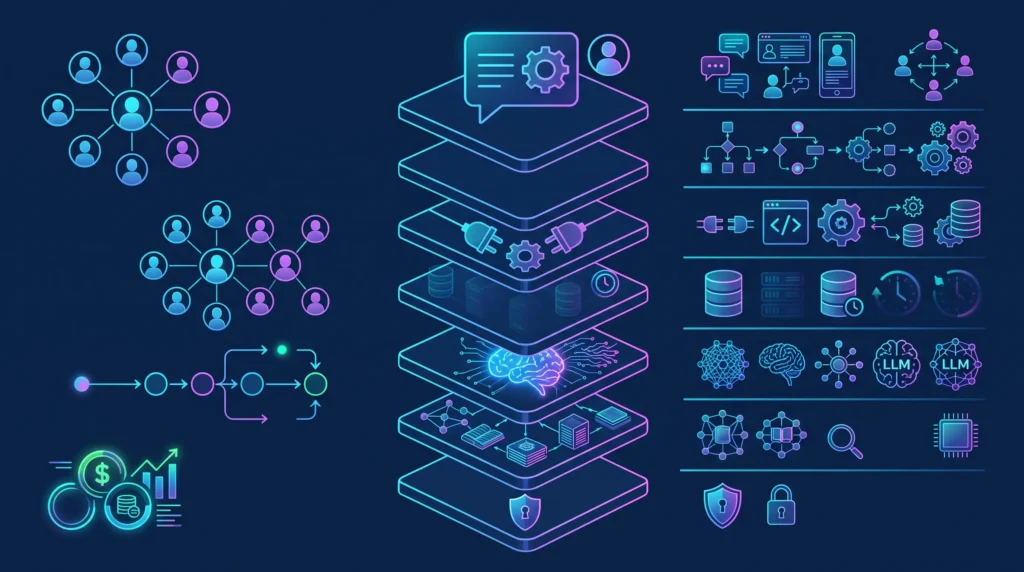
A business AI agent needs seven layers: an interface, an orchestration engine, a tool harness, state persistence, reasoning models, a knowledge base, and a governance layer. OpenAI’s guide defines the core of an agent as a model, tools, and instructions, and the layers below add what an enterprise needs around that core. Each layer has a distinct job, and the layers that fail silently (tools, state, and governance) matter most in production.
| Layer | What it does | Typical components |
| 1. Interface and channels | Captures user requests and system triggers, in real time or from events | Web consoles, Slack, Microsoft Teams, email, webhooks, CRM and ERP triggers |
| 2. Orchestration and planning | Breaks goals into steps, routes actions, assembles context, and runs the execution loop | Agent frameworks such as LangChain, LlamaIndex, or AutoGen; workflow engines such as Temporal or Camunda |
| 3. Tool harness | Exposes actions to the model and enforces input schemas, types, and sandboxed execution | MCP servers, OpenAPI connectors, Pydantic or Zod validation, Docker or AWS Lambda sandboxes |
| 4. State persistence | Saves checkpoints and transaction status so a failed task resumes instead of restarting | PostgreSQL run journals, Redis caches, idempotency key registers, Apache Kafka |
| 5. Reasoning models | Plans, parses language, and decides; routes simple tasks to cheaper models | Frontier models for planning; small open-weight models such as Llama, Qwen, or Mistral for triage |
| 6. Knowledge and memory | Retrieves company documents and business rules | Vector databases such as Pinecone, Qdrant, or pgvector; RAG pipelines; Snowflake or Databricks |
| 7. Governance, security, and observability | Controls access, sanitizes inputs, enforces approval gates, tracks token cost, and keeps replayable audit logs | Role-based access control (RBAC), OAuth 2.0 or SAML SSO, NeMo Guardrails or Guardrails AI, LangSmith or Arize Phoenix |
Which architecture decisions matter most?
Six decisions shape cost, risk, and speed, and each has a sensible default unless your situation says otherwise.
| Decision | Option A fits when | Option B fits when |
| Buy or build | Buy: a platform or pre-built agent covers the workflow and speed matters most | Build: the workflow is core intellectual property or needs custom integrations; many enterprises choose a hybrid |
| Cloud or private deployment | Cloud: managed services meet your data residency and security rules | Private: regulation or contracts require data to stay on your own infrastructure |
| RAG or fine-tuning | RAG: the agent needs current company knowledge with source attribution | Fine-tuning: the agent needs a consistent style or narrow skill that prompts cannot teach |
| Real-time or approved actions | Real-time: the action is reversible and low risk | Approved: the action is irreversible, costly, or customer-facing |
| Stateless or persistent memory | Stateless: each request stands alone | Persistent: the task spans sessions or many steps and must resume after failure |
| Single-tenant or multi-tenant | Single-tenant: one client’s data must stay isolated | Multi-tenant: several teams share one agent under access controls |
Reliability needs one more design choice. Give every write-capable tool an idempotency key, a unique identifier that makes a retried request run only once, so a network retry cannot pay the same invoice twice.
Key takeaway: invest first in the layers a demo skips — typed tool contracts, persistent state, and governance. They decide whether an agent survives its first production incident.
What changes in enterprise AI agent development at scale?
At enterprise scale, the controls around the agent matter as much as the agent: security, compliance, data governance, reliability, integration, and change management. A pilot can skip most of them, and a production agent cannot. Gartner notes that integrating agents into legacy systems is technically complex, often disrupts workflows, and can require costly modifications.
| Requirement | What it means in practice |
| Security | Identity-aware access, least-privilege permissions for every tool, secrets management, and encryption |
| Compliance | GDPR, CCPA, SOC 2, HIPAA, PCI DSS, or sector rules, mapped to each workflow; the EU AI Act adds transparency duties |
| Data governance | Approved data sources, classification, retention, lineage, and auditability |
| Reliability | SLAs, retries, fallbacks, rate limits, and graceful degradation when a model or API fails |
| Integration | Legacy systems, SSO, ERP and CRM platforms, internal APIs, and event-driven workflows |
| Change management | Employee training, process redesign, and clear ownership of results |
Who governs an enterprise AI agent?
Enterprise agents need named owners, not a shared inbox. A workable governance model has six roles:
- An executive sponsor and a business owner who answer for results
- A product owner for the agent workflow
- Engineering and data teams who build and run it
- Security, legal, and compliance reviewers who approve data access and risk
- An AI quality owner who maintains the evaluation suite
- End-user champions who feed back corrections
Operations-heavy sectors such as logistics and manufacturing add event-driven integrations with ERP, warehouse, and supply chain systems. Plan those integrations in discovery, because they set the timeline more often than the model does.
Key takeaway: treat governance as a delivery workstream with owners and deadlines. Integration and compliance work set the pace at which an enterprise agent reaches production.
How much does AI agent development cost?
AI agent development cost runs from about $15,000 for a proof of concept to $250,000 or more for an enterprise multi-agent system, based on 2026 pricing guides from Zignuts, Unico Connect, and RaftLabs. The spread is wide: Unico Connect puts enterprise multi-agent platforms at $150,000 to $300,000 and up, and RaftLabs quotes ranges reaching $400,000. Treat the table below as a planning range.
| Agent type | Typical scope | Indicative cost range (USD) |
| Proof of concept | One workflow, limited integrations, basic evaluation | $15,000 to $40,000 |
| Production MVP | One production workflow, core integrations, monitoring, guardrails | $40,000 to $100,000 |
| Business-critical agent | Multiple integrations, advanced workflow logic, security review, observability | $100,000 to $250,000 |
| Enterprise multi-agent system | Distributed agents, complex orchestration, compliance, custom infrastructure | $250,000 and up |
What drives AI agent development cost up?
Seven factors move the budget more than the choice of model:
- Token loops: Anthropic’s engineers report that agents use about 4 times more tokens than chat interactions, and multi-agent systems about 15 times more, so one multi-step task can cost as much as multiple single prompts.
- Integration depth: every system the agent reads from and writes to adds build, security, and test work, and legacy systems that need two-way synchronization cost the most.
- Evaluation and observability: offline test suites, red-teaming, execution logging, and latency monitoring add upfront work and monthly platform fees.
- Data pipelines: extract-transform-load (ETL) pipelines, document chunking, embedding generation, and vector database hosting add cost whenever the agent answers from unstructured company data.
- Compliance and security: access controls, data loss prevention, PII masking, and audit logging cost more in regulated sectors such as healthcare and payments.
- Human-review interfaces: approval screens, exception queues, and review dashboards need dedicated UX and UI design.
- Change management: training, documentation, and workflow redesign move people from doing the task to supervising the agent.
What does an AI agent cost to run after launch?
Running costs recur every month, while the build cost lands once, so budget for them from the first sprint. Expect six ongoing items:
- LLM and API usage plus hosting infrastructure
- Model upgrades and instruction maintenance
- Data pipeline and integration maintenance
- Security reviews and compliance updates
- Monitoring, evaluation, and incident response
- Product iteration based on user feedback
How do you keep AI agent costs under control?
Seven tactics hold unit costs down as volume grows.
| Tactic | How it reduces cost |
| Narrow initial pilot | A tightly bounded workflow limits integration hours, data engineering, and early testing |
| Cost-aware model routing | OpenAI’s guide notes that simple retrieval or intent classification can run on a smaller, faster model, while harder decisions such as refund approval justify a more capable one; distilling a routine task into a small open-weight model cuts per-call cost further |
| Prompt caching | Cached prefixes such as long instructions or documents cost less to re-read; Anthropic prices cache reads at one-tenth of the base input price on most Claude models |
| Minimal tool permissions | Exposing only the endpoints a task needs shrinks the prompt and the risk |
| Risk-based human review | Approvals for payments, external emails, and deletions only; low-risk paths run end to end |
| Hard execution limits | Turn limits, rate ceilings, and timeouts in backend code stop a looping agent from running up the bill |
| Cost per successful outcome | Total execution cost divided by completed tasks, including retries, fallbacks, and human escalation hours, shows the true return |
Key takeaway: track cost per successful outcome, not monthly model spend. Retries, fallbacks, and human escalation hours decide whether an agent pays back.
Increase the ROI of software projects by over 3x with AI-augmented remote development and design solutions tailored to your business goals.
Book a consultationWhat team do you need to build an AI agent?
A pilot needs six roles, and an enterprise delivery team adds architecture, data engineering, platform operations, compliance, and change management. The lean pilot team below can deliver a tightly scoped proof of concept.
| Role | What they do |
| Product manager or business analyst | Defines workflow boundaries, success metrics, user stories, and acceptance criteria |
| AI or LLM engineer | Builds prompt orchestration, RAG pipelines, tool execution logic, and model routing |
| Backend or integration engineer | Builds secure API connectors, database integrations, and idempotency handling |
| UX/UI designer (part-time) | Designs approval screens, exception dashboards, and review interfaces |
| QA or evaluation specialist | Writes test suites, validates tool-call outputs, and runs offline benchmarks |
| Security reviewer (as needed) | Reviews data access scopes, PII handling, and authentication |
Which roles does an enterprise delivery team add?
Moving from a pilot to a mission-critical or multi-agent system adds seven specialties:
- Executive sponsor: secures funding and removes cross-department roadblocks.
- Solution architect or tech lead: designs the seven-layer architecture, state machines, and resilience patterns.
- Data engineer: builds ETL pipelines, vector indexes, and unstructured data ingestion.
- DevOps or MLOps engineer: runs infrastructure, scaling, vector database clusters, and observability.
- Security and compliance specialist: maps GDPR, SOC 2, or HIPAA duties and builds prompt injection defenses.
- Change management lead: redesigns workflows, writes documentation, and drives adoption.
- Expanded QA and evaluation: runs continuous automated evaluations, edge-case testing, and red-teaming.
Should you build in-house, hire an agency, or use a hybrid model?
The right sourcing model depends on your internal skills, your speed target, and who should own the result long term.
| Model | Best when | Trade-off |
| In-house team | You are building core intellectual property or handling sensitive proprietary data | Higher fixed payroll and longer hiring timelines |
| Agency or partner | You need a first production build fast or specialized AI architecture skills | Faster launch with milestone-based pricing, but less internal ownership |
| Hybrid | You want a partner to deliver the architecture and first release while your engineers learn the system | Requires planned knowledge transfer |
AgileEngine offers three engagement models that map to these choices: team augmentation, dedicated teams, and solutions teams that deliver end-to-end with a fully managed cross-functional team. For UX work on human-review interfaces, the Design Studio covers approval flows and operator dashboards.
Key takeaway: hybrid delivery works well for enterprises: a partner builds the architecture and first release while your engineers pair with them and take over maintenance. That avoids both a long hiring delay and a permanent dependency.
How long does AI agent development take?
A first production agent typically takes three to six months from discovery to launch, and the later phases never fully end. The ranges below assume phases run back to back, and they stretch when legacy integrations or compliance reviews enter the plan.
| Phase | Typical duration | Key deliverables |
| Discovery and use-case selection | 2 to 4 weeks | Workflow map, KPIs, risk assessment |
| Architecture and design | 2 to 4 weeks | Architecture diagram, integration plan, guardrails |
| Prototype | 3 to 6 weeks | Working prototype, test cases, initial evaluation |
| Production MVP | 6 to 12 weeks | Secure deployment, monitoring, user feedback loop |
| Scale and optimize | Ongoing | Additional workflows, higher accuracy, mature governance |
What mistakes sink AI agent projects?
Most failures trace back to eight avoidable mistakes, and each has a direct fix.
| Mistake | What to do instead |
| Starting with a broad AI assistant | Pick one specific workflow with a measurable outcome |
| Underestimating data quality and integration work | Audit data and system access during discovery |
| Treating prompts as the whole product | Build tools, state, evaluation, and governance around the prompt |
| Skipping evaluation, observability, and fallbacks | Write the test suite and the failure behavior before launch |
| Granting excessive permissions early | Start with least privilege and widen access as the agent proves itself |
| Ignoring change management | Train users and redesign the process around the agent |
| Budgeting only for the build | Plan the running costs from day one |
| Leaving no business owner after launch | Name one accountable owner before go-live |
Is your business ready to build an AI agent?
Your business is ready when you can answer yes to most of these eight questions. Each unanswered question marks a gap to close before you commit to a build budget.
- We have a specific, measurable workflow.
- We can access the required data and systems securely.
- We know which actions require human approval.
- We have a named business owner and a technical owner.
- We have defined success metrics.
- We have a plan for testing, monitoring, and escalation.
- We have reviewed security, privacy, and compliance requirements.
- We have budgeted for both the initial build and ongoing operations.
What should you do next?
Treat enterprise AI agent development as an iterative product program with an owner, not a one-off software project. This week, list the three workflows where your team spends the most hours on repeatable, checkable work, and score each on data access, error visibility, and the cost of a wrong action. The highest-scoring one is your pilot.
If you want an outside view of that shortlist, AgileEngine can review it with you and size the build.
Grow faster with dedicated teams of top 1% software experts, speeding up time-to-hire by 3x and project delivery by 2x.
Let’s talkFAQs
The transparency duties in Article 50 of the EU AI Act became enforceable on 2 August 2026, including the duty to tell people when they interact with an AI system, while the marking duty for AI-generated content moves to 2 December 2026 for systems already on the market. The Digital Omnibus deferred the high-risk requirements to 2 December 2027 for standalone systems, so replayable logs and human override controls are good practice now and likely requirements later. This is general information, not legal advice.
State drift happens when an agent loses context or strays from its goal during a multi-step task. Teams prevent it with structured intermediate outputs checked against Pydantic or JSON schemas, automatic summarization of older context, and deterministic state machines that fix the workflow path.
Large API payloads and documents fill a context window quickly. Production systems cap and paginate tool outputs, cache static context, and store raw tool histories in external memory, passing the model only what the next step needs.
A well-built agent suspends the task instead of burning tokens on retries. Asynchronous queues, circuit breakers, and run journals record the current state, and idempotency keys make the retry safe or route the task to a human supervisor.
Run an offline evaluation suite against a dataset of happy paths, edge cases, and adversarial prompt injections. Measure more than final task completion: score tool selection, argument validity, policy compliance, grounding in source data, and the full execution path.









![A smartphone and a tablet with monetization elements (banner ad and in-app purchase button) displayed on the screen]](https://agileengine.com/wp-content/uploads/2026/03/How-Do-Free-Apps-Make-Money_-Monetization-Explained.webp)